


Customer complaints are inevitable, but how a business handles them defines its reputation and customer loyalty. This blog explains complaint management, its impact and how CRM helps resolve issues faster.
What is complaint management?
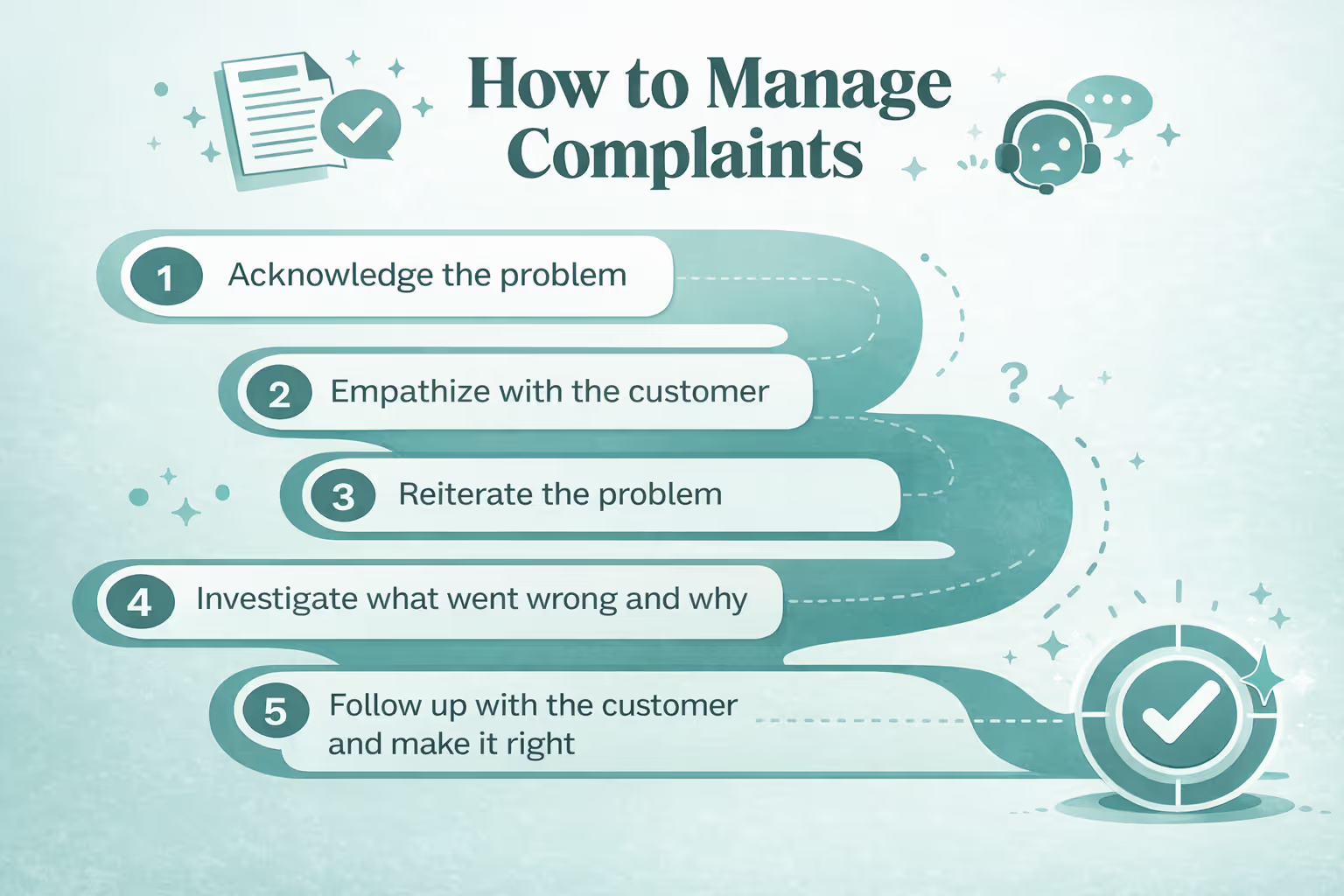
Key steps in complaint management process
1. Recording complaints
The first step is to record every customer complaint accurately, regardless of where it comes from. Whether a customer reaches out through email, phone, chat, or social media, their complaint should be logged in a central system along with relevant details such as the issue, customer information, and date of submission. A CRM makes this easier by bringing complaints from different channels into one place, reducing the chances of issues being overlooked.
2. Prioritizing issues
Not every complaint requires the same level of urgency. Businesses should prioritize complaints based on factors such as severity, customer impact, and how quickly the issue needs to be resolved. For example, a billing error or service outage may need immediate attention while a general product query can be handled later. Setting clear priorities helps support teams invest their time where it matters most.
3. Assigning responsibility to the right team/person
Once a complaint has been prioritized, it should be assigned to the person or team best equipped to handle it. Sending a technical issue to the technical support team or a billing complaint to the finance team ensures that the customer doesn't have to explain the same problem repeatedly. CRM automation can also help route complaints to the appropriate team based on the type or priority of the issue.
4. Resolving complaints
The next step is to investigate the complaint, identify the cause, and provide an appropriate solution. Support teams should have access to the customer's previous interactions, purchases, and complaints so they can understand the situation in context. Beyond simply closing the ticket, the goal should be to resolve the customer's actual problem and restore their confidence in the business.
5. Following up with customers
A complaint shouldn't necessarily end once a solution has been provided. Following up with the customer helps confirm that the issue has actually been resolved and gives them an opportunity to share additional feedback. A simple follow-up can also show customers that the business values their experience rather than treating complaint resolution as just another ticket to close.
6. Improving processes
Complaints can reveal problems that businesses might otherwise miss. Once complaints have been resolved, teams should analyze them for recurring patterns such as repeated product issues, delivery delays, or communication gaps. These insights can then be used to improve products, services, and internal processes. In this way, complaint management becomes more than just solving individual problems; it becomes a way to prevent the same problems from happening again.
How does CRM help in complaint management?
1. Centralized complaint tracking
All issues logged in one place, no missed complaints.
2. Automation
Auto assigns complaints to the right team, sets reminders for follow-ups. Since CRM systems have built-in ticketing, prioritization, and workflow automation, customer queries are resolved faster.
3. Omnichannel support
Captures complaints from email, chat, social media, phone etc. in one dashboard.
4. Customer history and context
Past purchases, issues, and conversations can be viewed in the CRM, enabling more personalized and efficient problem-solving.
5. Analytics and reporting
Provides insights into recurring issues, resolution times, and customer satisfaction, helping businesses improve their processes.
6. Self-service options
With features like FAQs, knowledge bases, and chatbots, CRM empowers customers to resolve simple issues on their own without contacting support.
{{callout-3}}
Best practices in complaint management with CRM
1. Acknowledge complaints quickly
Customers don't necessarily expect an instant solution, but they do want to know that their complaint has been heard. Acknowledge complaints as soon as they are received and let customers know what happens next. A CRM can help by automatically sending confirmation messages and creating tickets, while giving support teams a clear view of which complaints need attention.
2. Keep communication transparent
Don't leave customers wondering whether their complaint is being worked on. Keep them updated about the progress, expected resolution time, and any delays along the way. With a CRM, teams can track conversations and complaint status in one place, making it easier to provide consistent updates without making customers repeat themselves.
3. Use automation without losing the human touch
Automation can make complaint management faster, but it shouldn't make the experience feel robotic. Use automation for repetitive tasks such as ticket creation, routing complaints, sending acknowledgements, and follow-up reminders. When a complaint requires empathy, judgement, or a personalized response, make sure a real person takes over.
4. Train staff to handle complaints empathetically
A CRM can organize complaint data, but people are still at the heart of complaint resolution. Train employees to listen carefully, remain calm, acknowledge the customer's frustration, and focus on finding a solution instead of becoming defensive. Giving staff access to a customer's interaction history through the CRM can also help them respond with more context and empathy.
5. Continuously analyze complaint trends to prevent future issues
Complaint management shouldn't stop at resolving individual tickets. Look for patterns in your complaint data to identify recurring problems. For example, if customers repeatedly complain about the same product feature or billing issue, it may point to a larger problem that needs fixing. CRM reports and analytics can help businesses spot these trends and turn customer complaints into insights for improving products, services, and processes.
{{callout-2}}
Ready to turn complaints into opportunities? Discover how Superleap CRM can help you resolve issues faster and boost customer satisfaction.
Example
An e-commerce company resolving delivery issues via CRM ticketing
An e-commerce company receives frequent complaints about delayed deliveries.
Instead of manually tracking each issue, the company uses its CRM’s ticketing system to log every complaint in one place. When a customer reports a late delivery, the CRM automatically creates a ticket, assigns it to the logistics team, and sets a follow-up reminder. The support agent can view the customer’s order history and past interactions, which helps in giving a quick, personalized response. With analytics, the company identifies that delays are happening mostly in a specific region and works with the courier partner to fix the root cause.
As a result, resolution times improve, customer complaints drop, and overall satisfaction increases.



.avif)
%201%20(1).svg)
.svg)
.svg)
.svg)
.svg)