
.avif)


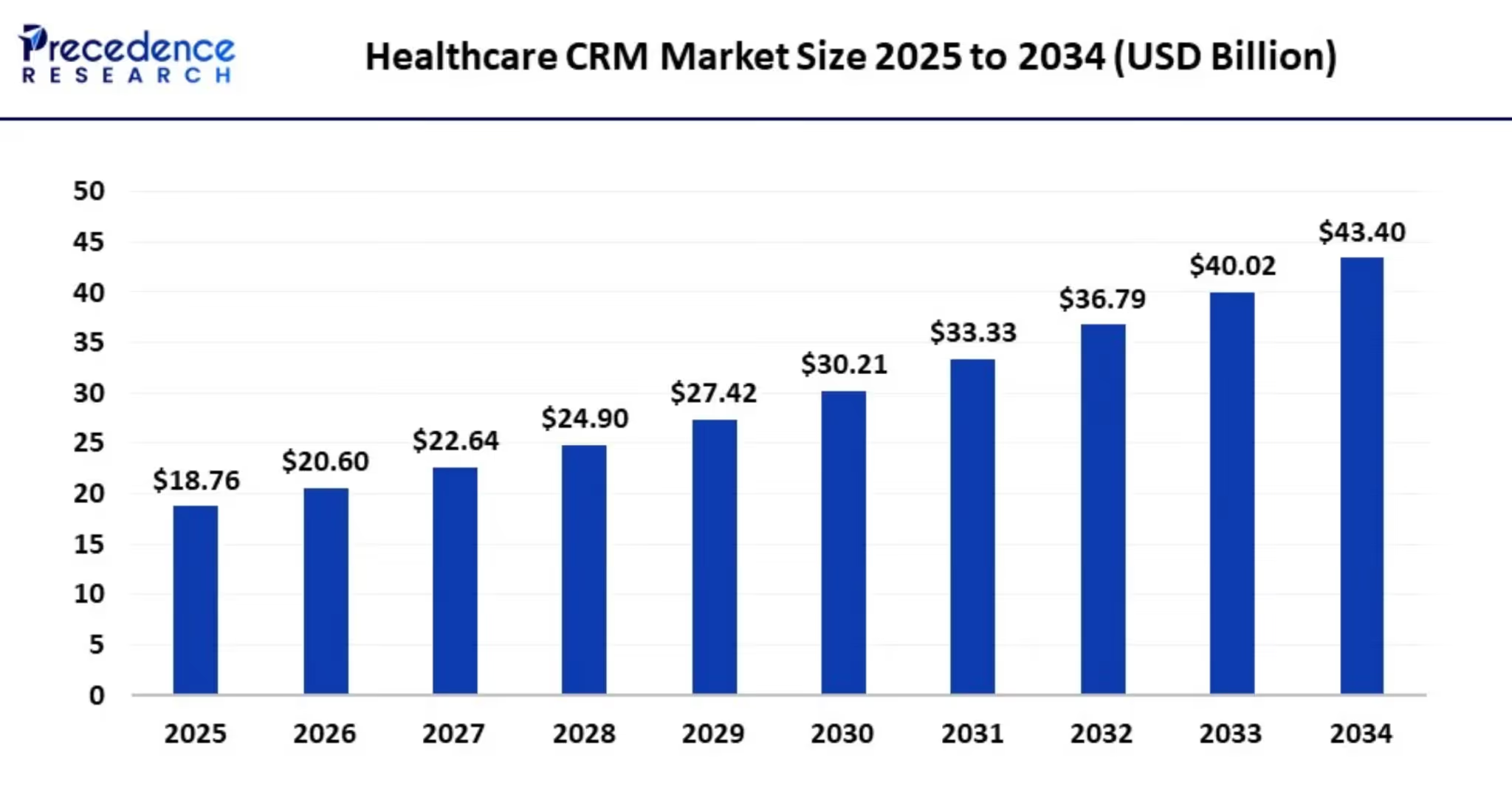
The need for a Customer Relationship Management (CRM) system is rapidly increasing in the healthcare sector. According to Precedence Research, the global healthcare CRM market was valued at USD 18.76 billion in 2025 and is projected to reach USD 46.68 billion by 2035, growing at a CAGR of 9.54% from 2026.
Let's explore the use of healthcare CRM software - and why compliance (HIPAA and data privacy) is essential.
What is healthcare CRM?
Unlike traditional business CRMs, healthcare CRMs integrate with Electronic Health Records (EHRs), billing systems, and scheduling tools.
These CRMs provide a 360° view of every patient, which supports personalized communication, accurate reporting and decisions that are data driven - all while staying compliant with healthcare regulations.
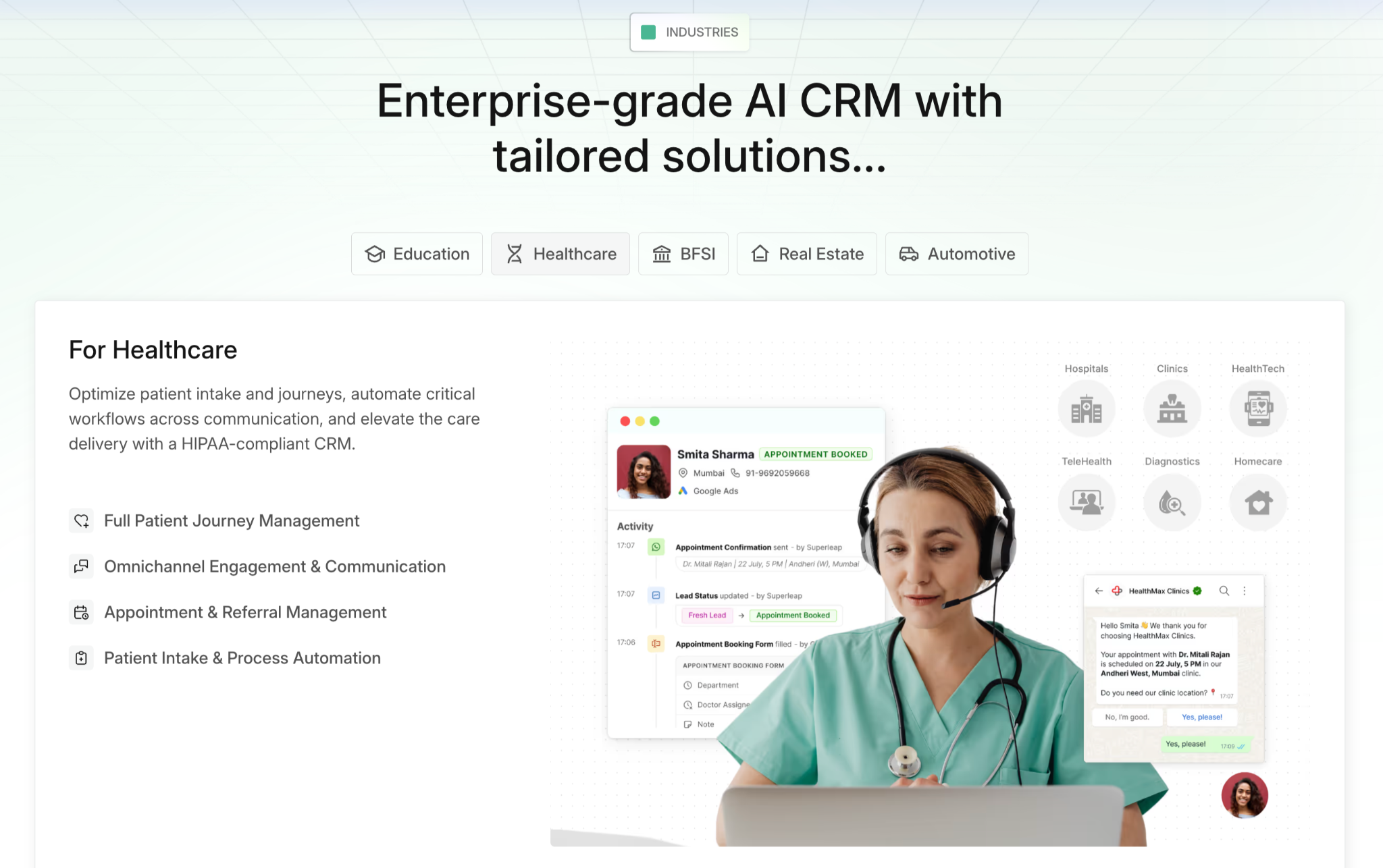
Superleap AI CRM is specifically designed to provide this 360 degree patient intelligence.
What are the benefits of a healthcare CRM?
A healthcare CRM has an impact across operations, marketing, and compliance. Here are a few benefits:
Enhanced patient engagement & communication: Stores complete patient history (appointments, treatments, prescriptions), which is used to send follow-ups, vaccination reminders or annual check-up prompts. Automated reminders about appointments, test results and medical schedules go out by SMS, email, or even WhatsApp, and this personalized communication strengthens the patient-provider bond.
Johns Hopkins Medicine offers an early example from 2015. Its marketing team built CRM profiles from website interactions to share health content suited to each visitor, and its international arm used a CRM to manage overseas patients from first inquiry to discharge.
Marketing, outreach & retention: A healthcare CRM segments patients (chronic illness, senior care, maternity, etc.), making it easier to run targeted campaigns to acquire new patients and also retain existing ones.
Segmentation also helps plan awareness drives, preventive care programs, seasonal health check-up promotions, and referral management workflows, and it makes it possible to measure ROI of marketing campaigns.
Operational efficiency: CRMs integrate with billing workflows, which keeps payment reminders automatic.
The system also gives staff clear visibility into insurance claims and outstanding dues, which can reduce patient confusion and speed up payment cycles.
Additionally, as healthcare organizations grow, whether by opening new locations, adding services or catering to a larger patient base, a cloud-based CRM adapts more easily without a heavy need for infrastructure change.
Compliance & security: Strict data privacy guidelines are incorporated into healthcare CRMs, frequently incorporating HIPAA compliance in the US or comparable local laws. The safeguards are covered in the HIPAA section below.
Selecting a platform like Superleap guarantees these robust audit trails and access control, necessary for PHI handling.
Where healthcare CRM is used
The core features stay the same across settings, but the daily use differs:
- Hospitals: coordinating follow-ups across departments and keeping referrals visible.
- Clinics: managing appointments, reminders and repeat visits with a small team.
- Diagnostic centers: sending booking confirmations and report-ready notifications.
- Emergency departments: tracking post-discharge follow-ups so patients are not lost once they leave.
For a vendor-by-vendor view, see our guide to healthcare CRM software by use case.
Healthcare CRM vs EHR
An EHR is the clinical record: diagnoses, medications, lab results and treatment notes. A CRM manages the relationship around that care: appointments, outreach, reminders, follow-ups and feedback. One holds the medical history, the other drives communication.
The two work best when connected. When the CRM reads from the EHR, a recent visit can trigger a follow-up message without staff re-entering anything. An EMR usually refers to a single practice's digital chart, while an ERP covers back-office work such as finance and procurement. A CRM does not replace any of them. It sits alongside them and connects the patient to the rest of your systems.
Key Features of a Hospital CRM Solution
CRM software that's HIPAA compliant
Privacy of patient data is non-negotiable in the medical field. HIPAA (Health Insurance Portability and Accountability Act) is a US federal law that requires healthcare providers, insurers and the vendors who work with them to protect Protected Health Information (PHI) from unauthorized access and breach.
Two points matter before you buy. First, a vendor that handles PHI on your behalf must sign a Business Associate Agreement (BAA), a contract that makes it responsible for safeguarding that data. Second, no software is "HIPAA certified" on its own, so compliance depends on how the tool is set up and used. If you operate outside the US, check comparable laws, such as India's DPDP Act or the EU's GDPR.
Compliance features that HIPAA include:
Access control: Access rights are given based on the role to view PHI (Protected Health Information).
For example, receptionists can view only basic patient details (contact, etc), and doctors can view all the medical history.
Data encryption: All patient records are encrypted. Algorithms like AES (Advanced Encryption Standard, 128+ bit) ensure that even if data is intercepted, it remains unreadable and protected.
Audit trails: Hospital CRMs log all activity, for example, patient record is changed with time stamp and user ID. In case of suspicious activity, an alert will be triggered.
Secure communication: Email and messaging within the CRM is protected for the safety of patient data when exchanged between providers.
Backup & recovery: CRM in hospital industry back up data and have disaster recovery plans to ensure no information is lost.
How to choose a healthcare CRM
Features show what a tool can do. These questions show whether the vendor is safe to rely on:
- Will they sign a BAA?
- Where is data hosted, and does that meet the data rules in your region?
- Which security certifications do they hold, such as SOC 2 or ISO 27001?
- What do onboarding and ongoing support look like?
- Can they share references from other healthcare customers?
Hospital CRM Implementation Guidelines
Define the problem statement: What are you aiming to solve? It could be improved operations, better engagement or even tightened compliance.
Shortlist your CRM options: Shortlist CRMs and integrations that fit your needs, budget and scalability, using the vendor questions above.
Trial run & selection: Pilot test the shortlisted CRMs for efficiency and ease of use and decide on one.
Sign the BAA & configure roles: Sign the Business Associate Agreement and set role-based access before any patient data goes in.
Migrate data & deploy: Move all the patient data to the new system, while retaining data quality. Our CRM migration guide covers the full process and checklist.
Staff training: Train your staff, evaluate performance and gather feedback to refine workflows.
How to measure results
Track a handful of numbers from the first month and compare each against your pre-CRM baseline:
- No-show rate: the share of booked appointments patients miss.
- Time to follow-up: how long after a visit or inquiry a patient is contacted.
- Response rate: how many patients act on reminders and campaigns.
- Referral conversion: how many referrals turn into booked appointments.
- Days to collect payment: the gap between billing and payment.
Check out Superleap AI CRM and book a demo today!



.avif)
%201%20(1).svg)
.svg)
.svg)
.svg)
.svg)